Run it from your phone
Most owners of small businesses aren't at a desk when the work arrives. A customer writes while you're at the bank. A quote is due between deliveries. PocketSocio gives you three ways to handle it from your phone.
No computer at all: PocketSocio Lite
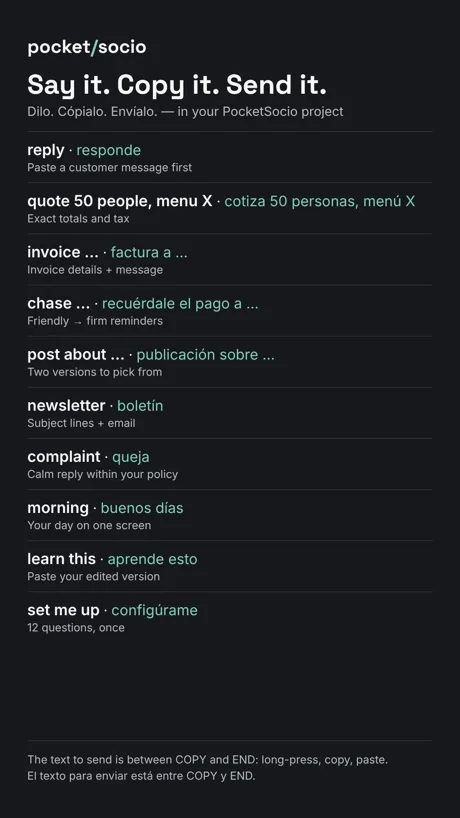
Lite lives in a Project inside the Claude app or the ChatGPT app. You upload its files once, answer the setup questions, and from then on you type the job: "reply", "quote 50 people, menu X", "chase Ana". The text to send always comes between two clear lines so you can long-press, copy and paste it into WhatsApp or email.
Lite runs the same price and money checks as the full edition. It covers 12 everyday jobs. See Lite
Computer on: steer the full edition from the Claude app
The full edition runs on your computer with all its skills, your files and the separate checker. Claude's Remote Control lets you continue that session from the Claude app on your phone. Type "what needs me?", read the list, then "approve 2". The work stays on your computer; your phone is the remote.
This needs a paid Claude plan, and the computer has to be on and awake.
Computer off: take an away pack
Going away? One phrase packs your prices, voice and rules into a single file. Add it to a Claude or ChatGPT Project and keep working on the road. When you're back, paste in what you approved and the full edition picks it up.
Tips that save time on a phone
- Save the phrase card to your photos. It has the ten phrases you'll use most, in English and Spanish.
- Paste the customer's message first, then say what you want. The reply comes back in their language.
- Say "learn this" and paste your edited version when you changed a draft. It turns repeated fixes into rules you approve.
App features change. Each download includes a dated table of what works where.